 Work06 · Shopify app
Cart Spy
Somebody filled a cart, then walked out.
They wanted what was in it, so the reason they left is probably somewhere in your store. Cart Spy follows each cart through checkout, replays the visit, maps taps and scrolls, and uses AI to suggest why the shopper left.
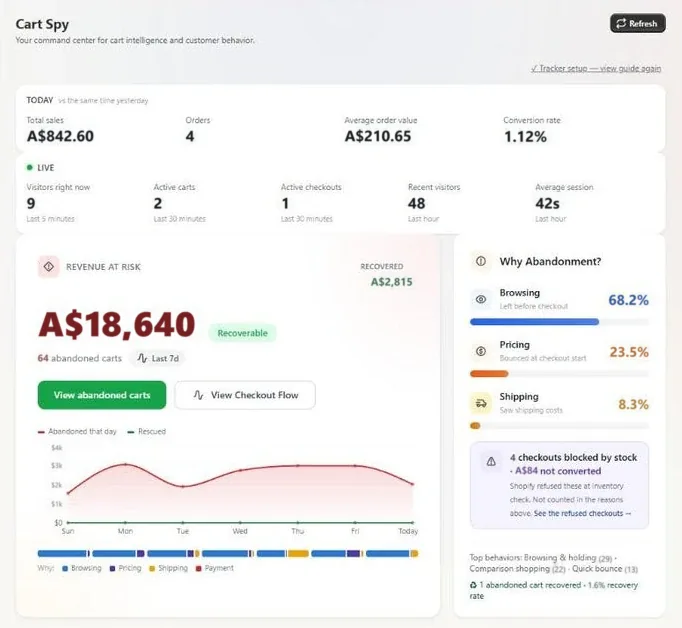
What a merchant sees on opening the app
- The top rowToday's sales, visitors, carts and checkouts, read at a glance.
- The Revenue at risk panelWhat the carts that never became orders were worth.
- The Why abandonment? panelThe question a merchant opens the app to answer.
- The past seven daysLost carts by day, so a bad day stands out from the week.
(01) · The problem
A count of lost carts is where the guessing starts.
Someone who fills a cart wanted what was in it. If they walk away at checkout, something in the store put them off, and that's good news, because a store can be fixed. The trouble is, a count of lost carts can't show you where to start.
So you guess at the shipping cost, the payment step, a slow page or a button nobody understood. You could change all four and still not know which one mattered. Cart Spy lets you look before you change anything.
- What a count tells you
- A cart was abandoned.That is the whole message, and it says nothing about where or why.
(02) · What we built
We built four ways to look at a lost cart.
Each answers a question a merchant asks when a cart goes quiet. Between them, one vague number turns into a short list of things to check.
About the pictures: the funnel and replay are screenshots from Cart Spy's App Store listing, and we drew the heatmaps and insight card to explain them. Every figure and word in them is made up for the example.
-
A · Cart-stage tracking
It shows the checkout step where each cart stopped.
Cart Spy tracks each cart through checkout, stage by stage. If most people leave at shipping, it shows at shipping, and the other steps can wait.
Worth a look: the step where shipping gets added.
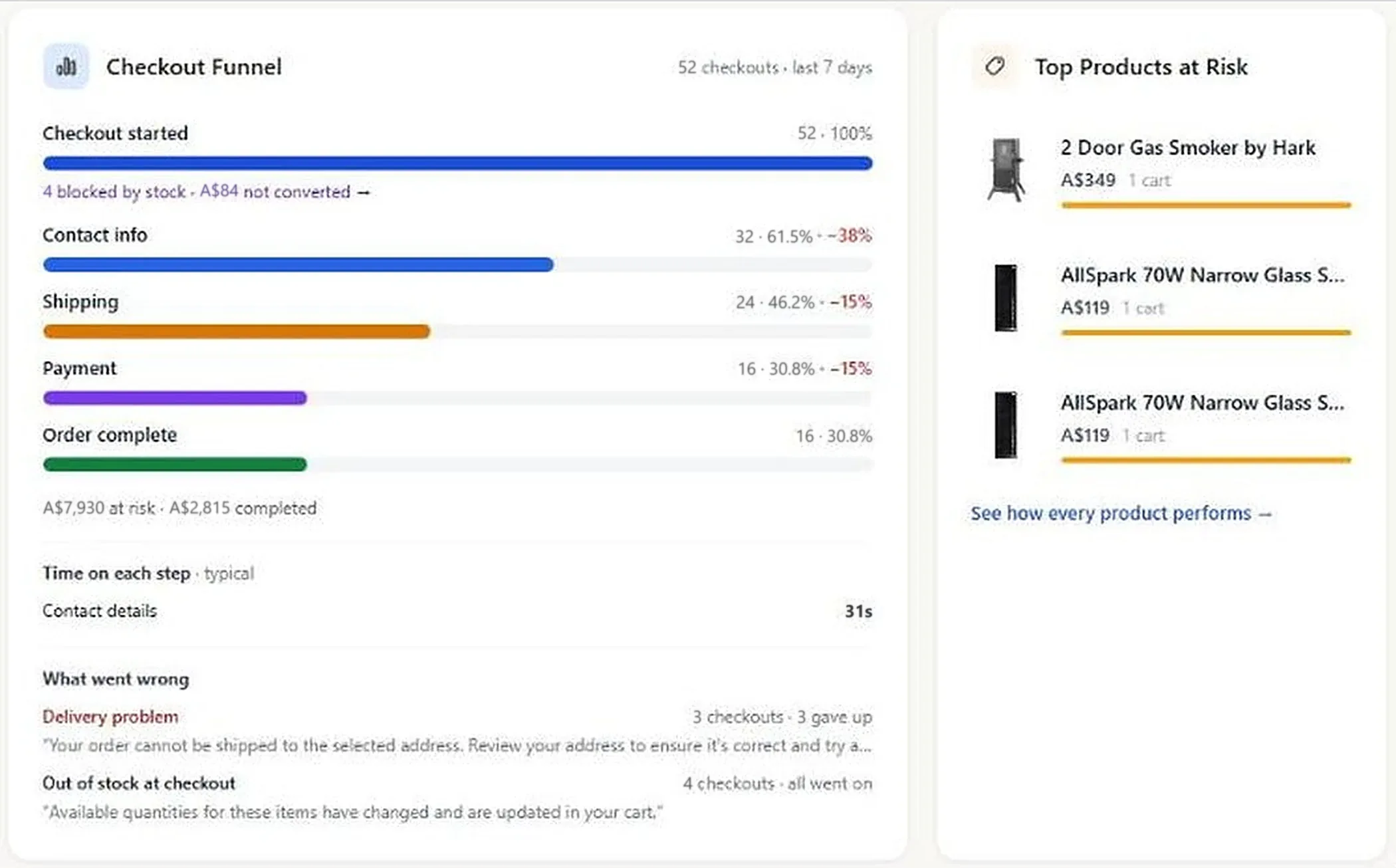
Checkout funnel · App Store listing screenshot · example data -
B · Session recording and replay
Watch the visit the way the shopper saw it.
Cart Spy records sessions so you can play them back like a video, and see where the shopper went, what they clicked and the moment they gave up.
Watch for: a scroll back up to the total.
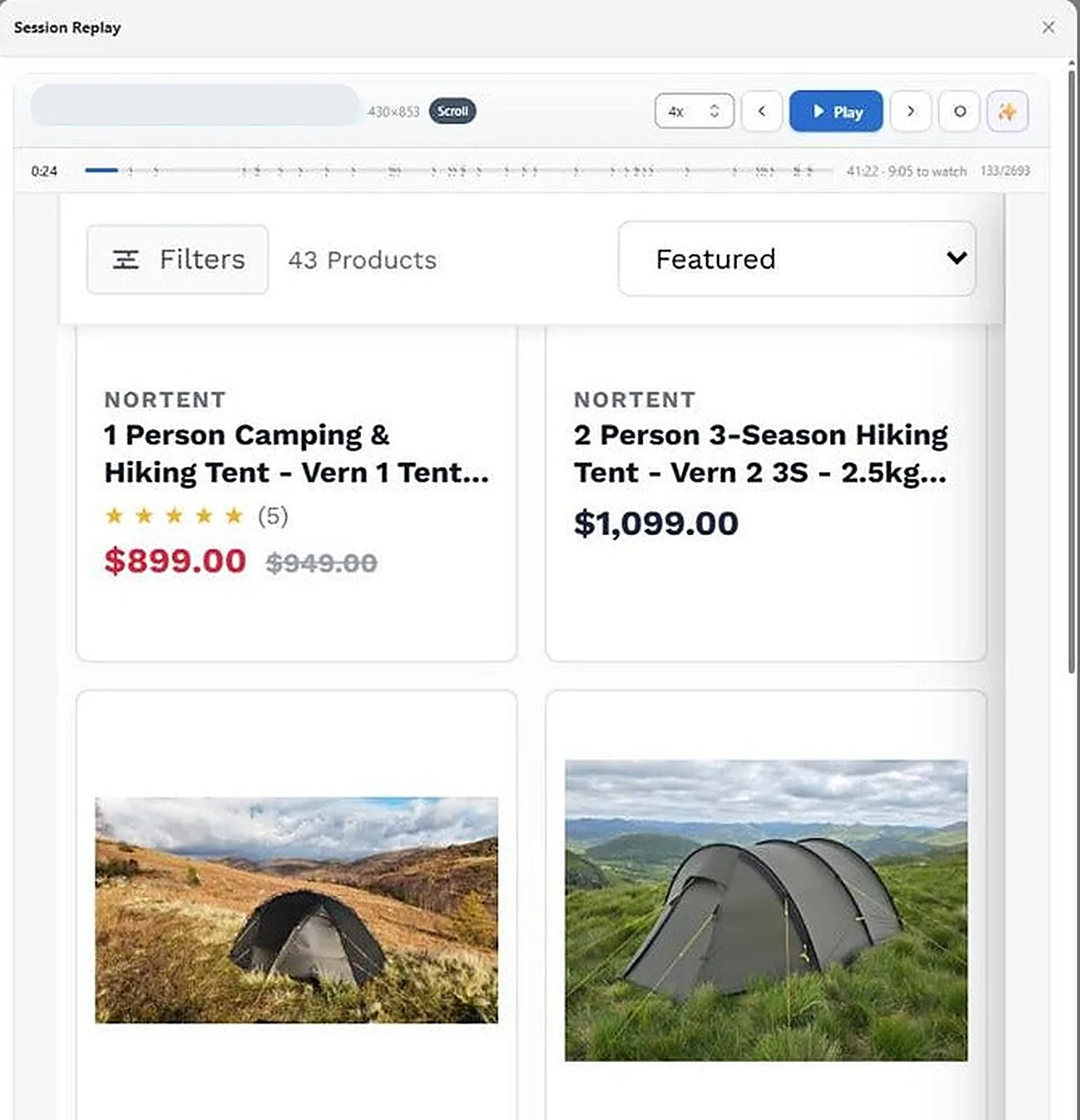
Session replay · App Store listing screenshot · example store, address hidden -
C · Click and scroll heatmaps
Heatmaps show where shoppers tap and how far they scroll.
The click map lights up the parts of a page people press. The scroll map fades as fewer of them get further down, which is bad news if your shipping cost sits below the fold.
On a phone: is shipping above the fold?
Example page- Many clicks
- Some clicks
- Most seen to least seen
- The fold
Here is one product page shown twice, once for where people tapped and once for how far down they scrolled.
Heatmaps · illustration · example page -
D · AI abandonment insights
The AI suggests a likely reason in plain sentences.
Cart Spy's AI abandonment insights give you somewhere to begin. Treat what they say as a lead, and check it against the replays and heatmaps, which are in the same app.
Before changing anything: watch a handful of those visits.
AI abandonment insight ExampleWhere carts were left- Cart
- Shipping
- Payment
- Order
Why, in plain wordsMost of these carts stop at payment.
Shoppers reach the payment step, scroll back up to the order summary, then leave. The delivery cost may have come as a surprise.
Our tipLook at the delivery cost on a phone first.
Check it against- Session replays
- Checkout heatmap
Insight card · illustration · the tip is ours

(03) · How the AI fits
Treat what the AI says as a lead worth checking.
Watching replays is slow, and most owners don't have the afternoon for it. So Cart Spy's AI gives you a short summary of why shoppers may have left. The tracking, replays and heatmaps are still in the app, so you can watch a few visits and make up your own mind.
-
01
The shopper wanted the product
So look at your checkout before you blame the buyer. A delivery cost that turns up late is a good first suspect.
-
02
A hunch is cheaper, if you trust it
If instinct is enough, you won't need Cart Spy. It's for owners who'd rather watch a few visits before a weekend of fixes.
-
03
Change one thing at a time
Make the change the evidence points to first, then give it a week of carts before you touch anything else.
(04) · How it runs
We built Cart Spy, and we still run it.
We designed and built it
Cart tracking, session replay, heatmaps and the AI insights are our own work, from a small studio in Melbourne.
Merchants install it from the Shopify App Store
It's listed there as a public app, alongside Spambuster, our other Shopify app.
We keep it running
Cart Spy is one of six products we look after, so its fixes and updates come from the people who wrote it.
(05) · For you
Here's what we could build for your store.
- 01
Shopify apps
A public App Store app or a private one for your store, kept running after launch.
- 02
AI agents and assistants
Cart Spy uses AI to summarise. We also build assistants and agents for jobs where AI saves someone time.
- 03
Growth and SEO systems
Knowing where people drop off is easier if the tracking goes in with the first build.
Lily answers a business's website chat from facts it has approved, and emails the owner the rest.